
I have been using this plugin for many years and it is fantastic. The directory provides many options and the support team is extremely responsive to any questions I have.


Last updated on March 10, 2022 by Arafat Bin Sultan
How to Create a Yelp Clone with a WordPress Listings Plugin
Want to launch a Yelp website? Instead of digging into how to create a Yelp clone, read this post! Save time with our Yelp WordPress plugin tutorial.

Inspired by Yelp? Are you imagining a local directory site like Yelp to serve your community? Well, building a Yelp clone can be a daunting task. But if you have the right tools, it will be pretty easy.
Yes, you’ve heard that right. In this post, we’ll show you how to create a WordPress Yelp clone. It will have features similar to Yelp, like Yelp reviews, claim your business call-to-actions, etc.
We’ll follow the easiest way. You won’t need to touch any code. We’re going to use a WordPress plugin. You can call it a Yelp WordPress plugin.
But first of all, why create a Yelp-like website?
- A Yelp clone can serve your local community with useful information.
- A Yelp-like site can be a great way to make money from paid listings.
- You can let the businesses claim a listing item and charge them a fee.
- A local directory site can earn you money by displaying ads on its pages.
- You can even charge the visitors to access some exclusive listings as well.
- An actively monitored Yelp-like website can become a reliable source of crowdsourced information that you can be proud of!
What are the best tools to create a Yelp clone?
To create a Yelp clone, we need just 2 things. First, a WordPress site. Second, a WordPress listings plugin to create the directory.
We’ve decided to use WordPress as the web platform for a reason. It’s the most popular Content Management System (CMS) out there. Besides, you can create a WordPress site in minutes with many web hosts.
To create a directory website like Yelp, we need listings functionality. A WordPress Yelp clone plugin will include all the tools you need. For this tutorial, we’ll use Business Directory Plugin – the best WordPress directory plugin. It will work as a Yelp WordPress plugin.
The good news is, you’ll save thousands of dollars along with tons of working hours by following this tutorial.
Wondering how? Check out the following comparison. We’ve shown the estimated time required to build some directory features from scratch vs using our WordPress plugin.
| Feature | Time Estimate (if built from scratch) |
Time Estimate
(if you follow our tutorial) |
| Adding/submitting content | 80-160 hours | 5-10 minutes |
| Uploading images or videos | 80-160 hours | 3-6 minutes |
| Filter integration | 300+ hours | 5-10 minutes |
| Filter by category | 40-60 hours | 5-10 minutes |
| Geolocation | 70-100 hours | 5-10 minutes |
| Reviews and ratings | 80-160 hours | 5-10 minutes |
| Readying the front-end user interface | 300+ hours | 30-40 minutes |
| Integrating payment methods | 70-100 hours | 10-30 minutes |
| Adding social login | 30-40 hours | 10-15 minutes |
We’ve mentioned only some core directory features in the above table. When it comes to the entire site, it would require much more time to build from scratch.
What can we expect from a Yelp clone website?
An ideal Yelp clone site would offer most of the core Yelp features. In fact, these are the gold standards in online directories:
- Local business and organization listings.
- Easy to navigate listing categories.
- Filtering and search functionalities.
- Paid listing and advertisement opportunities.
- Features like Yelp business review to ensure user trust.
- Geolocation and map integration for easier discovery.
- Coupons, discounts, and sale features.
- Claim listing capabilities for businesses and other authorities.
Our Yelp clone script for WordPress (Business Directory Plugin) has a free version that you can use to create a yelp page with very limited features.
However, to create a Yelp clone, we recommend you pick a premium plan of Business Directory Plugin. It comes with lots of powerful features that will offer advanced options for a Yelp website.
How to create a Yelp clone with our Yelp WordPress plugin
We’ll start with creating a fresh WordPress website. You can get your site up and running in a few minutes. Choose the best WordPress hosting based on your budget and requirements.
Also, you can get a hosting package from your domain name registrar. Once the site is online, please follow the steps below.
Step 1: Install and activate Business Directory Plugin
To get the Yelp-like features on your site, we need to install and activate Business Directory Plugin. If you have some prior experience with WordPress, this will be really easy.
Just go to your WordPress Dashboard → Plugins. Click Add New. Search for “Business Directory” and click the link to install it from the WordPress repository.
Activate it after the installation. Then install the premium version as well. See our knowledge base article on how to install Business Directory Plugin for more.
Once we get Business Directory Plugin premium onboard, we want to install some of its modules. These will add the Yelp-like features to our Yelp clone site.
To do this, go to WordPress Dashboard → Directory → Modules. Install Google Maps, Ratings, Regions, and Claim Listings.
To offer a better search and location experience, you can install the ZIP Search module as well. Explore all the modules and enable more if you want.
Step 2: Create directory related pages
After activating the plugin, you’ll see a prompt on the back-end to create a listing page. Follow that to create your universal directory listing page. Business Directory Plugin has basically 2 types of directory-related pages.
- The submission form page
- The listing pages (single and archives)
You can make a directory submission form by placing the [businessdirectory-submit-listing] shortcode on a page. It’s really that much easy. It’s a front-end form.

Need to customize the form fields? We have form field customization guidelines for that!
For listing pages, you can use our shortcodes to get custom pages. For a single listing business page, visitors would expect a review widget which you can achieve using our Ratings and Reviews module.
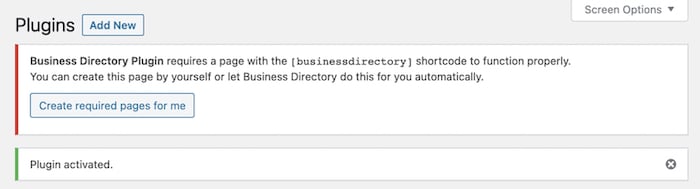
You can manage all of your directory pages from your WordPress Dashboard → Pages.
Check out a directory archive screenshot below. We’ve used our Modern Business theme to get this design.

Step 3: Configure the Yelp WordPress plugin settings
Business Directory Plugin has an extensive range of settings options. You can use them to make your directory function the way you like. Here’s a screenshot of the settings panel of our Yelp WordPress plugin.

In many cases, you’re good to go with the default settings. And of course, we have explained these settings in our very detailed documentation!
You don’t need to be worried about getting a yelp clone WordPress theme. Our native directory templates can do the work for you. Just check them out! Our pro plugin (in fact a suitable premium plan) can help you a lot here.
If you want to customize the look and feel of your site, please check the resources below:
- Best WordPress directory themes to use with Business Directory Plugin
- How to customize Google Maps styles on your WordPress directory
Step 4: Set the plans and payments
Business Directory Plugin lets you create and manage multiple pricing plans for the listing items. You can charge your customers based on the listing features.
You can learn how to add and manage plans for your Yelp clone from our docs. Also, set up payment methods in Business Directory Plugin so that your site can be ready to accept payments right away.
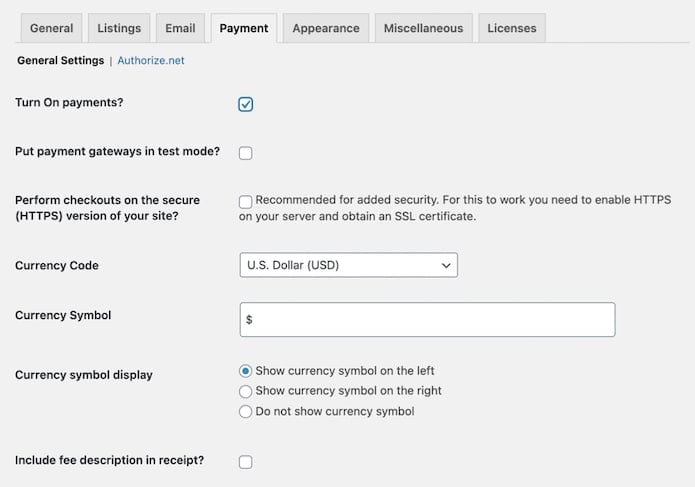
After successfully completing the above steps, you’re ready to launch your Yelp clone to the public. Display Yelp-styled directory items with email addresses so that the owners can be contacted easily.
Since our primary focus is making your directory successful, and ensure that people search for your business, so don’t forget to make it SEO-friendly. Also, share it on social networks to build a solid social appearance.
Bonus: Additional functionalities
If you want to make your Yelp clone site’s login experience a bit easier, a social login plugin can help. This will enable your users to sign in to your website with their social media or online account.
You can install the Nextend Social Login WordPress plugin to get the social login feature on your listing site. It has both free and paid versions. Choose whichever you find suitable for your project.
Web push notifications can be another helpful feature for better user engagement. A push notification service like PushEngage will let you send browser push notifications to your subscribers at any time. It has advanced segmentation and tracking features as well.
Wrapping up
We hope you’ll find this tutorial helpful while creating a Yelp clone on your own. Please share your experience with us via comments. Also, let us know if you have any questions.
Business Directory Plugin premium is risk-free with a 14-day money-back guarantee. Get it now and launch your Yelp clone today!
This article may contain affiliate links. Once in a while, we earn commissions from those links. But we only recommend products we like, with or without commissions.